

How to view a demo in KSS

How to view a demo in KSS
MARCOPLAY.COM • 25.11.2012 23:28 (14 years back)

Messages:
736
Topics created:
341
Thanks:
335
25.11.2012 23:28 (14 years back)
Topic rating
0.0
Rate topics
by rating ✖
by rating ✖

После того как нам удалось записать демо, мы можем его воспроизвести в игре. View демо file можно только through игру Counter-Strike Source. По крайне мере on данный момент это самый известный способ воспроизведения демо. Чтобы воспроизвести демо recording нам необходимо выполнить следующие actions:
КАК ПРОСМОТРЕТЬ ДЕМО:
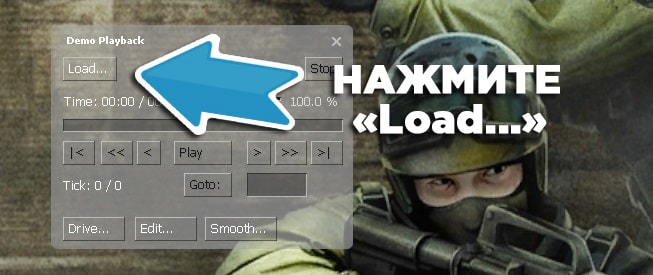
Зайдите в игру Counter-Strike Source and click комбинацию клавиш (зажать Shift и нажать F2 не отпуская клавишу Shift) в меню игры «SHIFT + F2». You have появится окно воспроизведения демо записи под названием «Demo Playback».
Выберите «Load...» в правом вверхнем углу окна
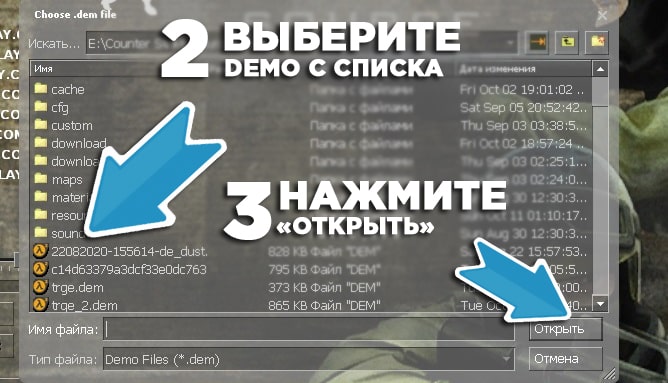
Выберите демо file с каталога который хотите просмотреть and click «Открыть» or дважды кликните по нему курсором мыши
Теперь началось воспроизведение demo записи. Управлять демо Вы можете с помощью окна воспроизведения демо как обычным плеером.
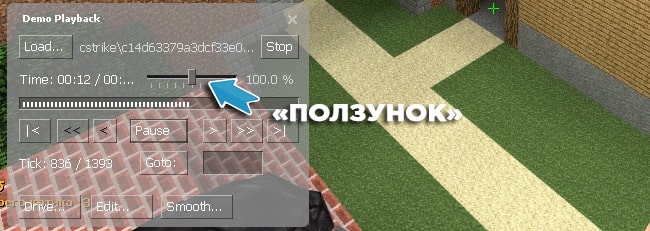
КНОПКИ ПЛЕЕРА:
Важные кнопки плеера и их описание:
- Load... - выбрать демо с каталога для просмотра
- Stop - остановить воспроизведение демо-записи
- «Ползунок» - изменение скорости воспроизведения демо
- Play - начать воспроизведение демо
- Pause - приостановить воспроизведение демо
- GoTo - перепрыгнуть on определенный tick демо записи (For new CSS чаще total срывает просмотр демо при «GoTo», поэтому для быстрой перемотки демо рекомендуем во время воспроизведения использовать команду в консоли «demo_timescale» (ниже написано подробнее))
Для того чтобы быстро перемотать демо recording можно использовать в окне воспроизведения кнопку «GoTo», но так как для новой CSS эта кнопка зачастую вызывает остановку воспроизведения, вместо того чтобы перепрыгнуть к определенному участку демо, то есть другой вариант быстрой перемотки демо: использовать консольную команду «demo_timescale 99999». Teams:
- «demo_timescale 1» - Скорость воспроизведения по умолчанию
- «demo_timescale 2» - Скорость воспроизведения в 2 раза быстрее
- «demo_timescale 3» - Скорость воспроизведения в 3 раза быстрее и так далее
- «demo_timescale 999999» - Максимальная скорость воспроизведения

Last edited MARCOPLAY.COM (6 years back)
Thanked (1):


Guest
16.05.2013 20:05 (13 years back)
I press Shift+F2, press load and nothing happens(

Messages:
736
Topics created:
341
Thanks:
335
16.05.2013 20:24 (13 years back)
Place the .dem file in the game folder and in the cstrike folder and try again
Thanked (1):
Guest
16.05.2013 21:03 (13 years back)
Playing DEMO per player
You want to view the (demo) demo in CSS for cheats or violations that were on the server. This article describes in detail how to do this in several ways....
There are special programs for viewing demos:
Demomanager
Demo freak
SKPlayer
GeekPlay
You can also watch the demo using the Counter Strike Source (CSS) game itself and the console in it:
1. Drop the demo file (*.dem) into the folder with the control in the cstrike subfolder or if there is cstrike_russian then here
2. Run CSS
3. Press "~", open the console, write u in the command line
playdemo "demo name"
orviewdemo "demo name"
Example:
playdemo marcopolo
viewdemo marcopolo
4. We are waiting for processing and the demo starts playing
5. When finished it will turn off automatically
Problems and their solutions:
A. The demo does not play, it says file not found:
this means that the demo itself (*.dem) was copied to the wrong place, it should be in the cstrike subfolder, or if there is cstrike_russian, then in it
B. Writes the wrong format:
it means the demo was not recorded correctly, or is faulty, or was recorded with a special program for movie movies, find a program for viewing demos and try to watch it
S. demo is not shown, writes something about the mapYou don’t have a map in CSS on which this demo was written, you need to copy this map to the map folder in CSS.
You want to view the (demo) demo in CSS for cheats or violations that were on the server. This article describes in detail how to do this in several ways....
There are special programs for viewing demos:
Demomanager
Demo freak
SKPlayer
GeekPlay
You can also watch the demo using the Counter Strike Source (CSS) game itself and the console in it:
1. Drop the demo file (*.dem) into the folder with the control in the cstrike subfolder or if there is cstrike_russian then here
2. Run CSS
3. Press "~", open the console, write u in the command line
playdemo "demo name"
orviewdemo "demo name"
Example:
playdemo marcopolo
viewdemo marcopolo
4. We are waiting for processing and the demo starts playing
5. When finished it will turn off automatically
Problems and their solutions:
A. The demo does not play, it says file not found:
this means that the demo itself (*.dem) was copied to the wrong place, it should be in the cstrike subfolder, or if there is cstrike_russian, then in it
B. Writes the wrong format:
it means the demo was not recorded correctly, or is faulty, or was recorded with a special program for movie movies, find a program for viewing demos and try to watch it
S. demo is not shown, writes something about the mapYou don’t have a map in CSS on which this demo was written, you need to copy this map to the map folder in CSS.
Guest
17.05.2013 13:32 (13 years back)
Thank you, thank you very much, I looked (dska) *hlopc* *hlopc*
Messages:
736
Topics created:
341
Thanks:
335
17.05.2013 13:36 (13 years back)
I QUOTE: Thank you, thank you very much, I looked (dska) *hlopc* *hlopc*">
There is a thank you button! (Mmmmm)
Thanked (1):
Guest
17.05.2013 14:01 (13 years back)
And they also say: you can’t pour thanks into a glass))))))
Messages:
736
Topics created:
341
Thanks:
335
17.05.2013 14:24 (13 years back)
You Sprut click thank you! Onion grief :/ Increase your rating. I didn’t ignore you!
Thanked (1):
Related discussions
Useful materials Counter-Strike: Source
MARCOPLAY's how-to instructions complement the user forum threads and help you quickly find the setting or material you need.
