

Menu
How to connect to the servers
In order to connect to the game server of interest, you only need the server address, copy it and use the Counter Strike Source game to connect to the server at this address.
On the page server monitoring You can find the main address of the server and additional (mirror) if it is present.

- 1Copy the server address
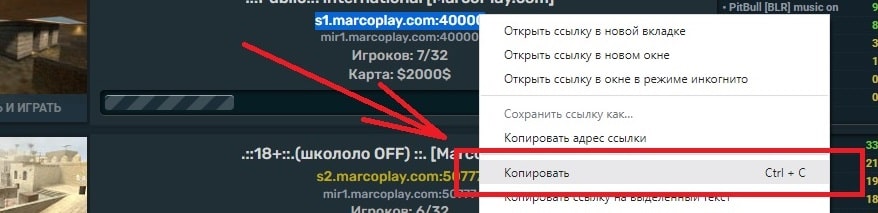
- 2Download Counter-Strike: Source if the game is not installed and run.
In the game menu, select «Find Servers»
- 3In the window above, open the «Favorites» tab and click the «Add» button at the bottom right

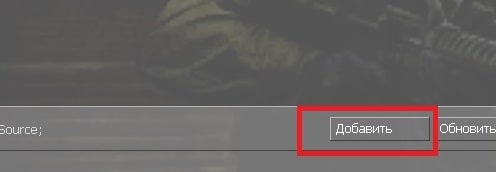
- 4In the input field, enter the previously copied game server address and click the «Add this address to favorites» button
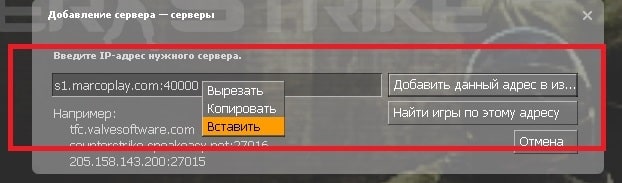
- 5After adding a game server, it will appear in the list of servers in the "Favorites" tab. Double-clicking the left mouse button on the name of the game server will start connecting to the game server.
You can also connect to the game server by right-clicking on the name and selecting «Connect»
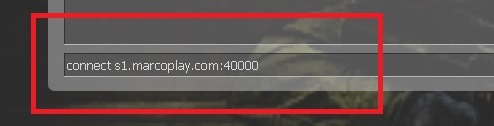
You can also connect to a game server without adding it to «Favorites», for this open console and enter the command «connect ADDRESS», where ADDRESS - is the previously copied server address. After entering the command, simply press the «Enter» key and you will start connecting to the server.
If the game is not installed yet or you are launching it for the first time, follow the guides for installing CSS, the first launch and basic game settings. If the game does not start or connect, open the common problems guide.
